Building Shopify's Merchant Marketing Platform

13 min read | Shopify (2017–2023) · Staff Product Designer · Marketing Tab Lead

Over six years on Shopify's Merchant Marketing team, I took the Marketing Tab from a handful of ad integrations to a full merchant growth platform. Then I rebuilt its analytics from the ground up once merchants could finally run sophisticated marketing but had no way to tell if any of it was working. The platform work alone drove a 52% increase in sales attributed to marketing activity.

Shopify Marketing Tab, showing a merchant's campaign overview

Context

Key Finding

In Shopify's Annual Merchant Survey, 91% of merchants said their biggest challenge was marketing their business.

When I joined Shopify in 2017, the Marketing Tab was just a handful of ad integrations: Google, Facebook, and little else. Merchants had strong commerce fundamentals (inventory, payments, fulfilment) but nothing built to help them grow beyond those two channels. If a merchant wanted to send an email or set up an abandoned cart flow, they were doing it across unconnected third-party tools, with no way to see the combined effect.

Marketing is one of the most intimidating activities for a small business owner: it requires confidence in channels you don't fully understand, budgets you're nervous to spend, and results that are hard to interpret. Merchants didn't know where to start, what was working, or how their scattered activities connected to each other.

Shopify's opportunity was clear: become the place where merchants ran their store and grew it. My job was to figure out what that looked like, and then keep figuring it out as the problem evolved over six years.


Key Insights

Research Foundation

17-participant, six-month diary study, long enough to watch how merchants' marketing needs actually shifted across a full season.

Merchants don't think in "channels"; they think in goals

Reframed design around merchant goals instead of the platform they were using

Marketing is a loop, not a one-time action

Shaped the Marketing Mental Model (Trigger → Goal → Build → Act → Measure → Learn), a framework shared across PM, design, and research

Beginners and experienced merchants had fundamentally different needs

Tiered entry points: easy defaults for beginners, advanced controls for experts

Merchants couldn't connect their marketing activities to each other

Core brief for Campaigns and the Unified Marketing view

The best merchants were already running sophisticated multi-step playbooks: manually, every time

Brief for Templates: make what the best merchants were already doing available to everyone

Building the Platform

Ad Integrations
Shopify Email
Campaigns
Templates
Automations
Campaign Reports
Unified View

Early ad integrations → a full marketing and analytics platform · Lead designer across all seven phases

Phase 1

Ad Integrations

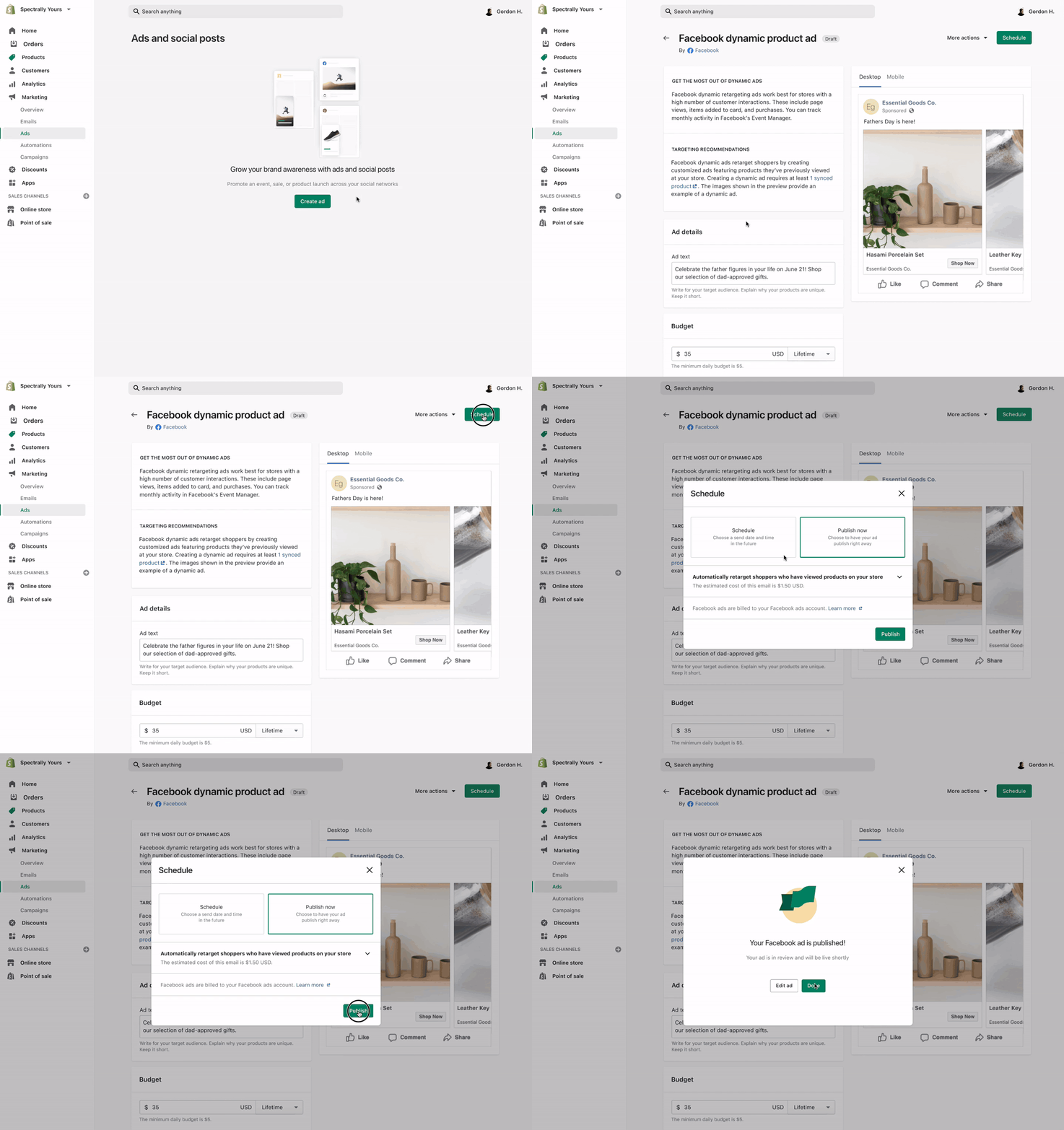
The Marketing Tab launched with ad integrations, giving merchants more tools to grow their store without ever leaving the Shopify admin. The goal was to absorb the complexity that comes with connecting to platforms like Google and Facebook: business accounts, domain verification, two-factor authentication, pixel and server-side tracking, catalog feeds, restricted ad categories, so merchants could run marketing through partnership-driven, platform-native integrations instead of piecing it together themselves.

The design challenge was creating a coherent, Shopify-native surface on top of very different underlying systems, each with its own data model, terminology, and edge cases.

admin.shopify.com/marketing/integrations
Marketing
Overview
Campaigns
Automations
Email
Integrations
Marketing Integrations
Add integration
G
Google Ads
Smart Shopping · Connected
Active
Spend
$1,240
Revenue
$4,820
f
Facebook & Instagram
Advantage+ · Connected
Active
Spend
$890
Reach
12.4k
+
Add channel
P
Pinterest
Not connected

Phase 2

Shopify Email

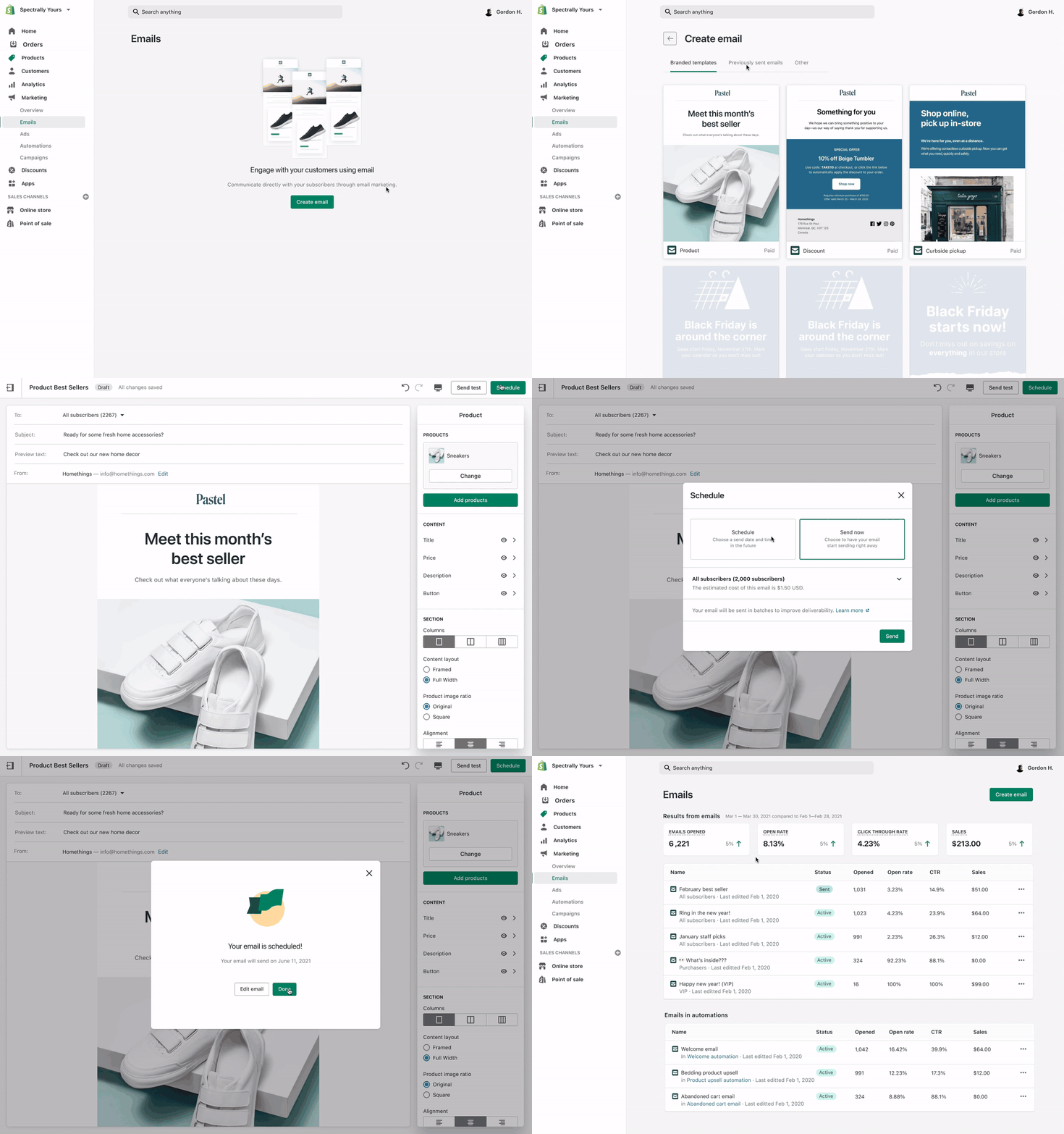
The next move was a strategic one: build email natively rather than partner with a tool like Mailchimp or Klaviyo. Email is the channel that converts the most customers and holds the richest customer-segment data, and owning it meant tighter integration with commerce data and the ability to build deeper features over time, like the automations we shipped down the road.

I was part of the initial discovery work for Shopify Email, then handed it off to a new team who would go on to lead the product. The partnership between our two teams continued to shape several patterns on the Marketing Tab side: richer, responsive-aware previews of email content, and a visual-editor step in the integration creation flow.

admin.shopify.com/marketing/email/new
Marketing
Overview
Campaigns
Automations
Email
Integrations
New email campaign
Campaign name
Summer Sale — August 2019
To
All subscribers (14,280)Change ›
Subject line
☀️ Our biggest sale of the year starts now
Template
Sale promo
Product highlight
Newsletter
Review & send
Save draft
Preview
SUMMER SALE
Up to 40% off
Shop the sale

The Next Challenge

Every tool we added over the years gave merchants more ways to grow, but it also introduced a new problem. Merchants were running ads, email, and promotions as separate, self-contained units. Our research showed that the best merchants planned in multi-step plays anchored to a single goal, not individual channels. Campaigns became the thread that connected everything a merchant was doing toward that goal.

Phase 3

Campaigns

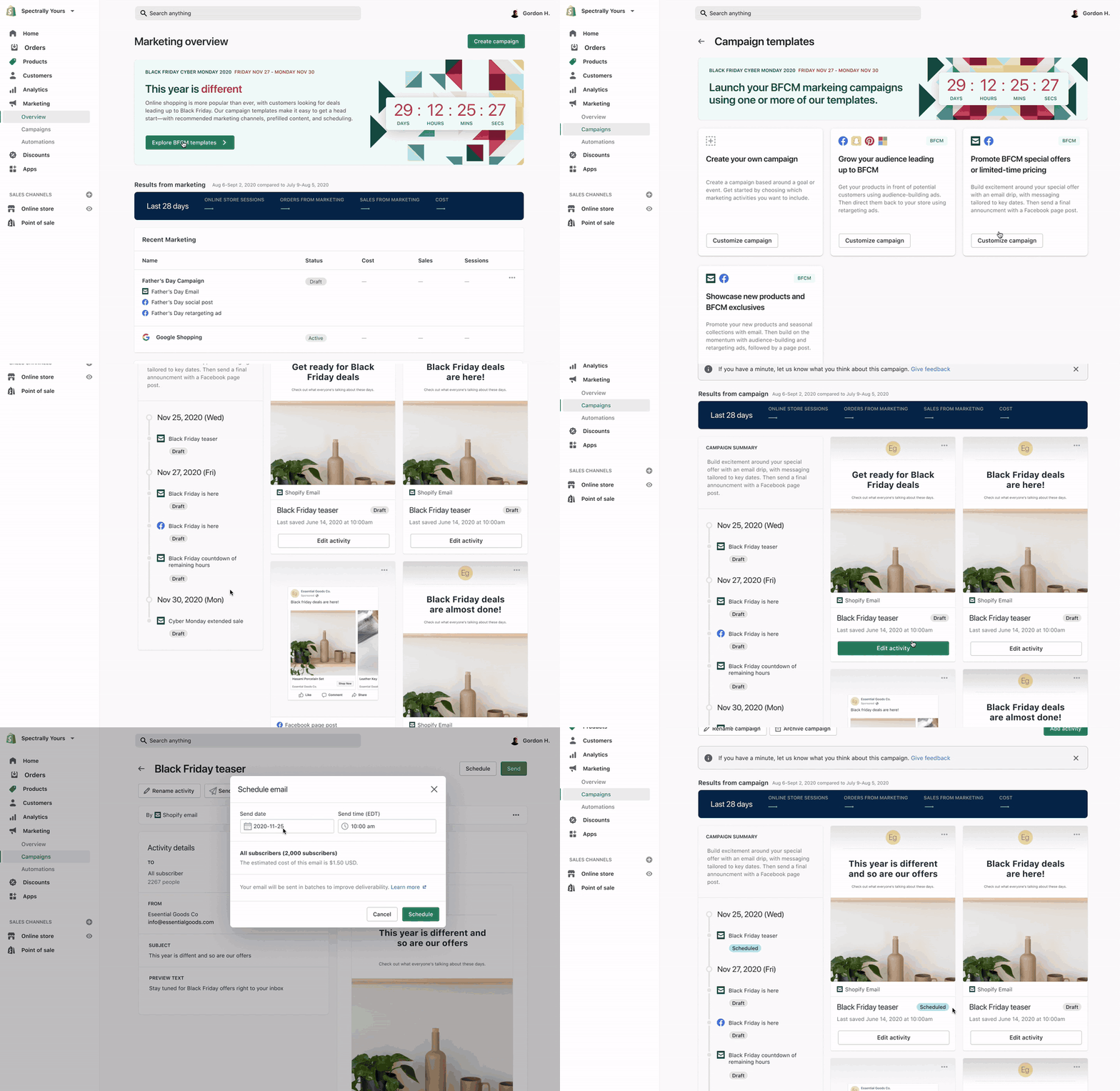
The first version of Campaigns introduced a simple but important idea: merchants could group related marketing activities (an ad, an email, a discount) under a single campaign name and goal. For the first time, a merchant running a Father's Day promotion could see everything tied to that moment in one place: Facebook audience-building ads, dynamic retargeting, Shopify Email sends, page posts, each with start dates, spend, and status.

The design challenge was significant: multiple channels, each with different data models and lifecycle states, all had to feel coherent inside a single surface.

Campaign list — grouping related activity
admin.shopify.com/marketing/campaigns
Marketing
Overview
Campaigns
Automations
Email
Integrations
Campaigns
Create campaign
Campaign
Channels
Status
Revenue
Father's Day 2020
Jun 1–21, 2020
G
f
@
Active
$8,240
Spring Collection Launch
Apr 10–30, 2020
f
@
Ended
$5,180
Back to School
Aug 1–15, 2020
G
Draft
Campaign detail — full multi-channel orchestration
admin.shopify.com/marketing/campaigns/bfcm-2021
Campaign · Nov 19 – Nov 30, 2021
Black Friday Cyber Monday 2021
ActiveGoal: Drive $12,000 in sales
Edit
Add tactic
Tactic
Start
Spend
Revenue
Status
G
Google — Audience building
Smart Shopping · $50/day
Nov 12
$490
$2,140
Active
G
Google — Dynamic retargeting
Display · $30/day
Nov 19
$210
$1,820
Active
f
Facebook — Advantage+ Shopping
All placements · $60/day
Nov 19
$660
$3,280
Active
@
Shopify Email — BFCM announcement
14,280 subscribers
Nov 24
Free
$1,940
Scheduled
Total spend
$1,360
Total revenue
$9,180
Goal progress
76% of $12k

Phase 4

Templates

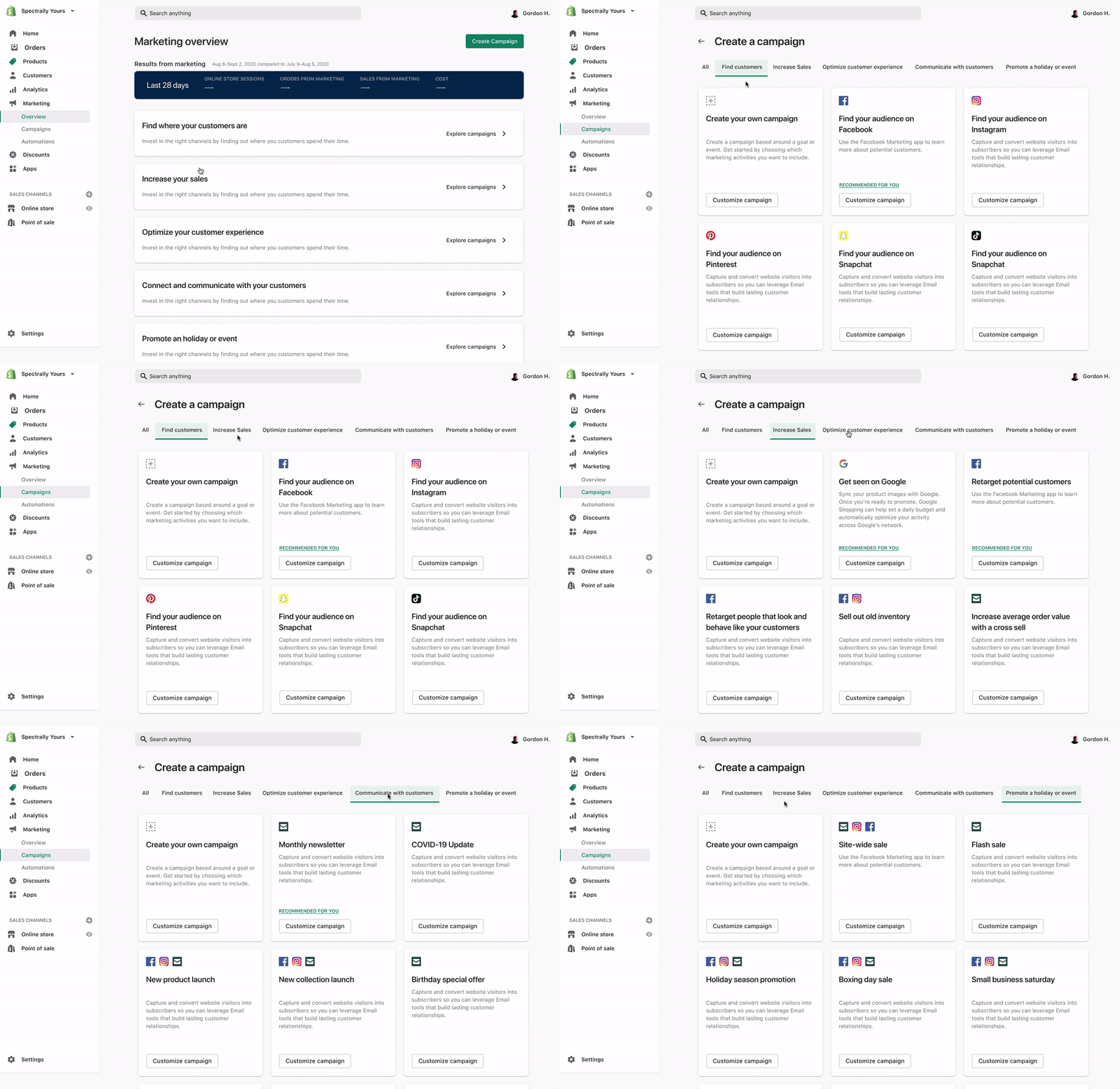
Templates turned a pattern we'd observed in research into a product feature. Our most successful merchants were running the same playbooks repeatedly: a specific combination of ads, email, and post-purchase flows for every major sale moment. Templates codified those playbooks and made them available to every merchant.

A merchant launching a Back-to-School campaign could start from a template that included the goal, the recommended channel mix, the suggested timeline, and the key tactics pre-configured, then customize from there. The design problem shifted from "how do you create a campaign?" to "how do you understand a campaign strategy and make it your own?"

Campaign Templates
12 available
Sale event
Black Friday / Cyber Monday
12 days · 4 tactics
G
f
@
Seasonal
Back to School
14 days · 3 tactics
G
@
Holiday
Father's Day
7 days · 2 tactics
f
@
Product
New product launch
10 days · 3 tactics
G
f
@
Sale event template
Black Friday / Cyber Monday
Goal
Drive revenue over a 12-day sale window using retargeting, email, and new audience acquisition
Tactics
G
Google — Audience building
Start 7 days before · $40–60/day
f
Facebook — Dynamic retargeting
Start sale day · $30–50/day
@
Shopify Email — BFCM announcement
Day 1 · All subscribers
Use this template →

Phase 5

Automations

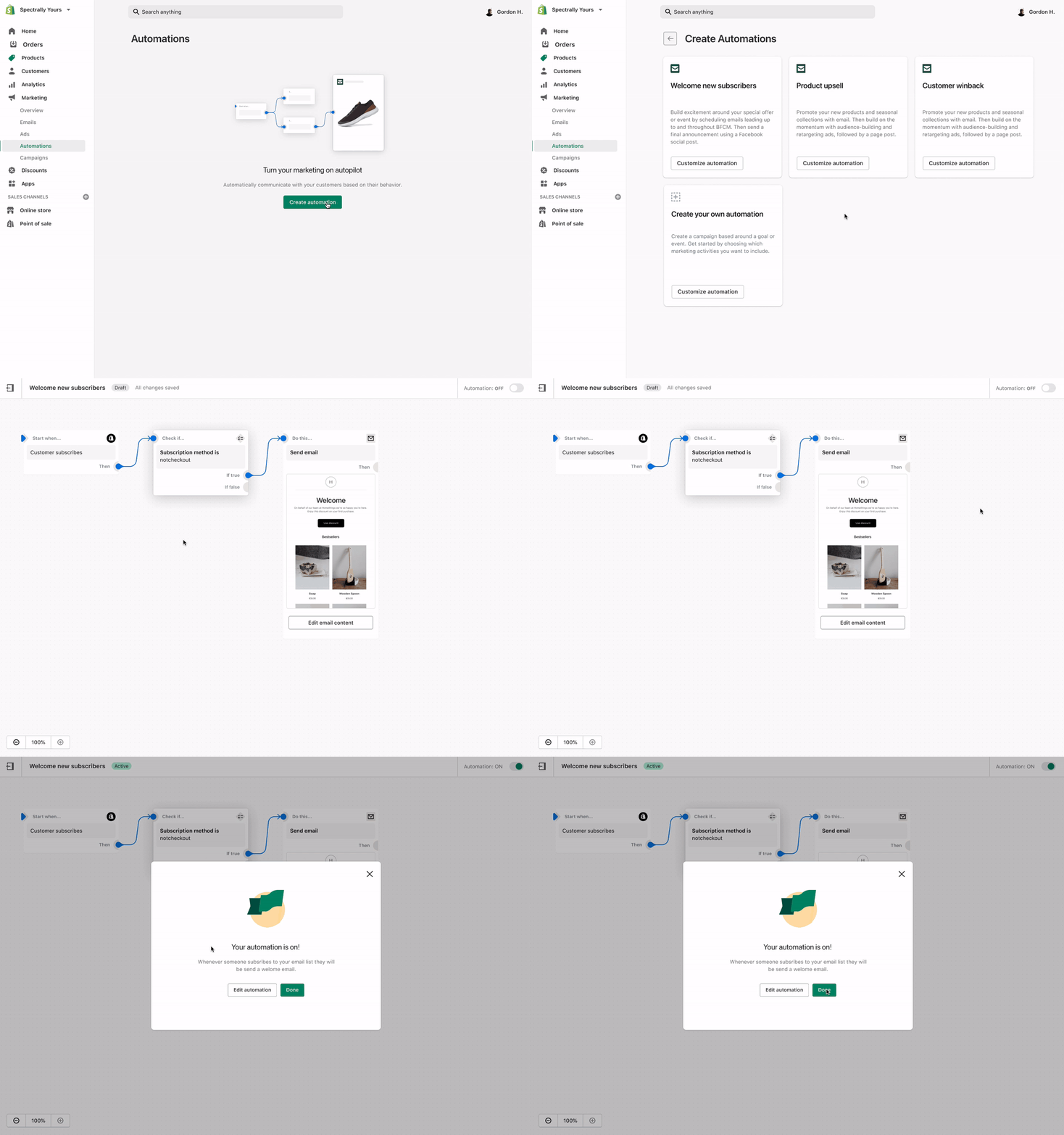
Part of what we learned from studying merchants' playbooks was that a large share of their marketing already ran on autopilot: sequences of triggered actions run over and over, based on what a customer did, without a person re-launching the same campaign each time. Automations brought that time-triggered and behaviour-triggered logic natively into the Marketing Tab. Merchants could set up abandoned cart recovery, post-purchase sequences, win-back flows, and more, without manually re-running the same campaign each time.

The design challenge was sophistication: automations range from single-step to complex multi-branch sequences. We designed a tiered experience: pre-built automations for merchants who wanted to start immediately, and a workflow builder for merchants who wanted full control.

admin.shopify.com/marketing/automations
Pre-built automations
Build custom
Abandoned cart recovery
Automatically email customers who left without purchasing
3 steps · Email
Welcome new subscribers
Send a welcome series to new email subscribers over 7 days
4 steps · Email
Win-back lapsed customers
Re-engage customers who haven't purchased in 90 days
2 steps · Email + discount
Post-purchase upsell
Follow up after purchase with related product recommendations
2 steps · Email
Birthday offer
Send a personal discount on customer birthdays automatically
1 step · Email + discount
+
Build from scratch

The Next Challenge

By this point, the Marketing Tab could run everything: ads, email, automations, templates. But its analytics were still rudimentary. They couldn't answer a simple question: how a campaign performed as a whole, across every channel, including the ones running outside Shopify.

Phase 6

Campaign Reports

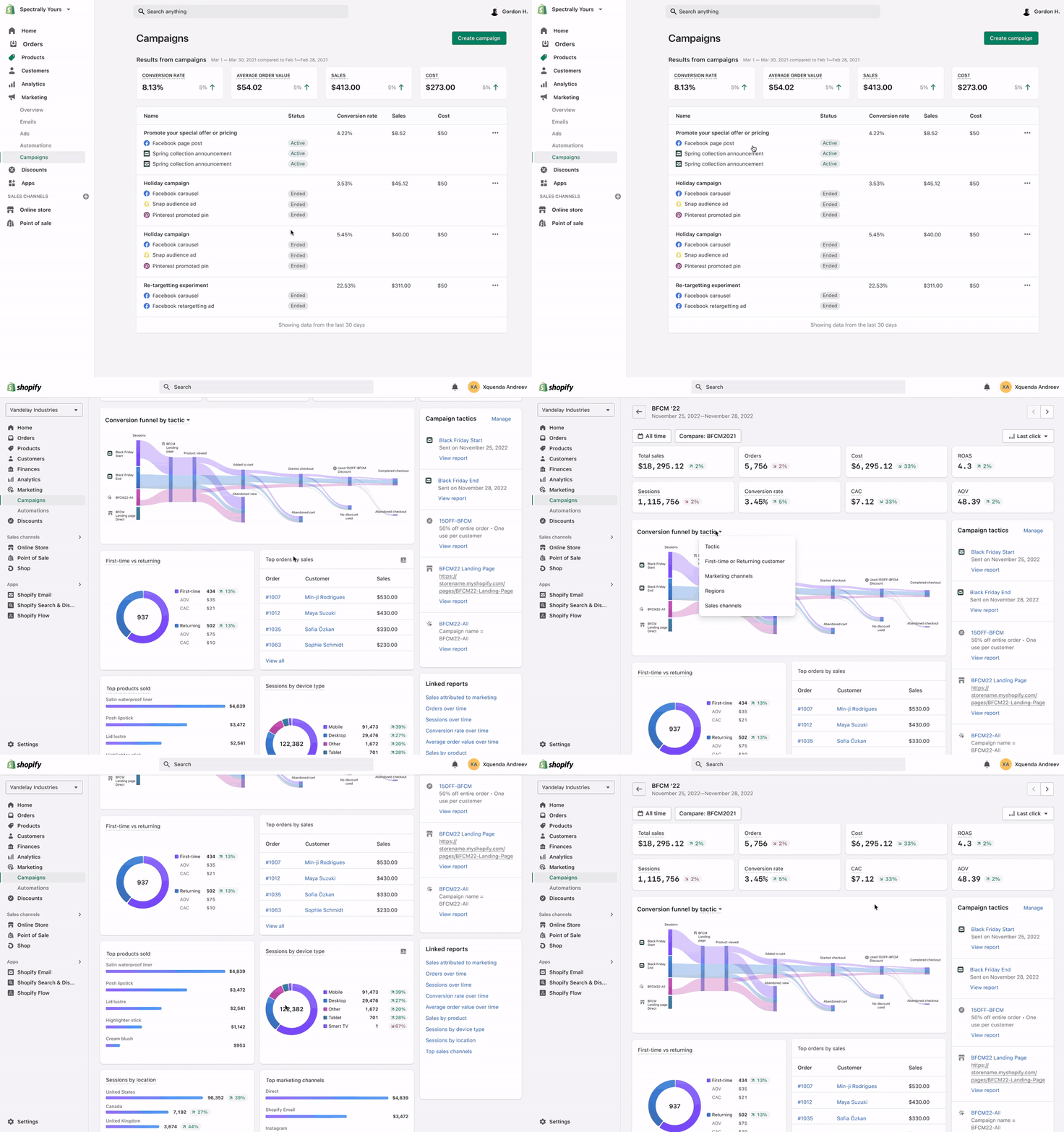
Before this, a merchant's only view into performance was scattered: an individual report for each marketing activity (an ad, an email) or a channel-level report (Google, Facebook, and so on). Impressions, clicks, and ROAS existed in isolation inside each one, disconnected from any sense of how the campaign was doing as a whole. Campaign Reports gave merchants a single place to understand what drove results, compare channels, and decide where to invest next: goals versus actuals, a channel-level breakdown, performance over time, and attribution context, all in one view.

We also gave merchants the ability to link campaigns they ran outside Shopify into that same view, using UTM parameters. That mattered most for sophisticated merchants working with agencies or running marketing entirely through external platforms: they could still see everything in one place.

The harder design challenge was attribution. Most channels report their numbers using their own model for how a click or a sale gets counted, and those models disagree with each other. We had to settle on one universal model for Shopify's view without eroding merchant trust when our numbers didn't match what they were seeing inside the channels themselves. The most important design decision here was surfacing the attribution model and data source directly alongside the numbers. Making the methodology transparent gave merchants the context to trust the data and make decisions from it.

Campaign Report · Nov 18–29, 2022
Black Friday / Cyber Monday 2022
Attribution: Last click
7-day window
Revenue over time
Daily · 12-day window
Nov 18 Nov 24 Nov 29
Channel breakdown
Channel
Revenue
Spend
ROAS
Data source
G
Google Ads
$6,240
$1,120
5.6×
Shopify
f
Facebook
$4,740
$940
5.0×
Shopify
A
Agency (external)
$3,840
↗ Linked
Agency campaign linked via UTM parameters, with 5-day click window attribution.

Phase 7

Unified Marketing View

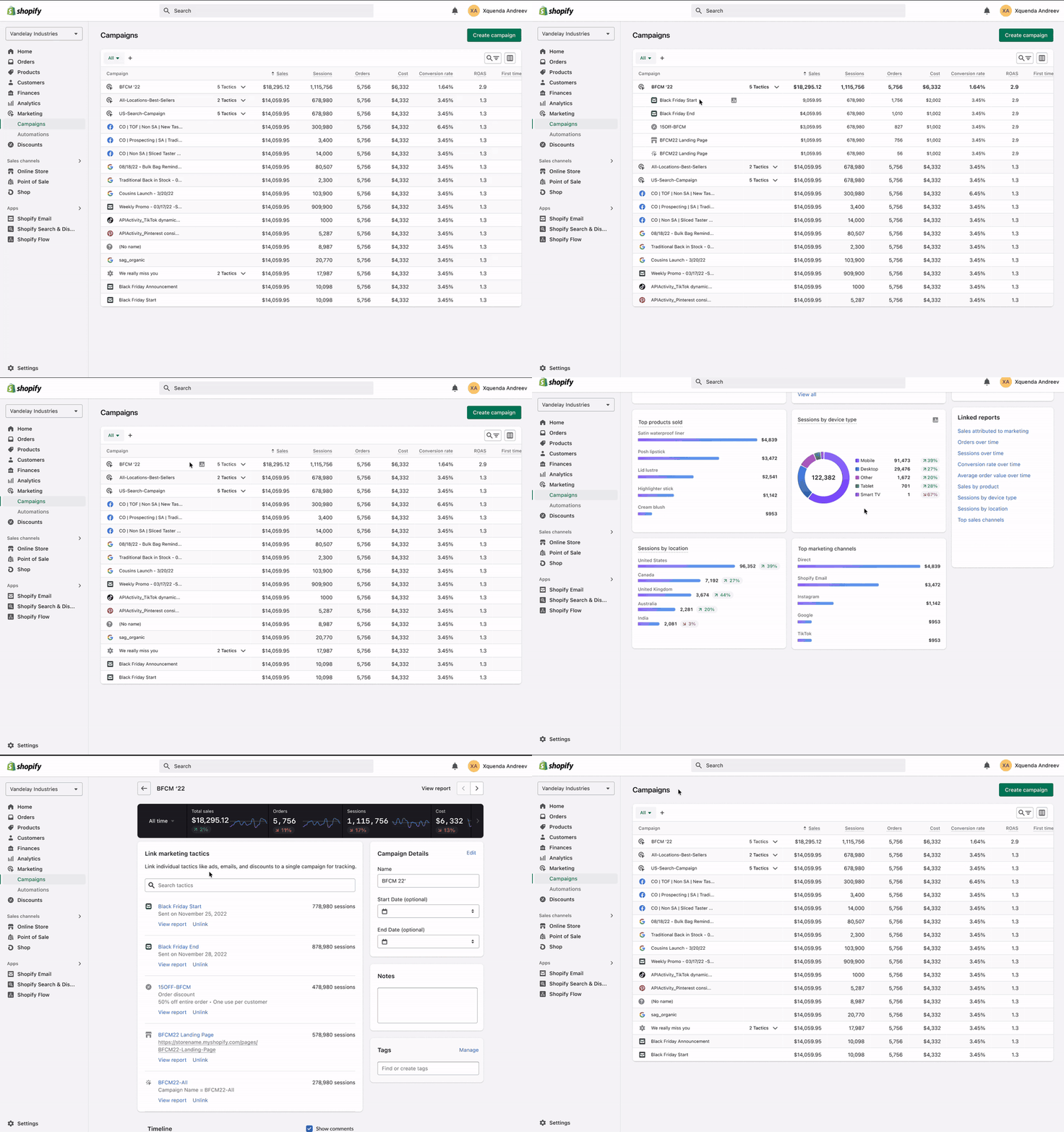
The Unified Marketing view was the top-level view that pulled everything together. Every campaign (whether run entirely in Shopify, partially in Shopify, or connected from an external platform) appeared in a single table. Merchants could see their complete marketing picture at a glance: status, KPI summary, channel mix, and spend.

The design challenge was data heterogeneity: different channels have different metrics, different attribution windows, and different definitions of "success." The solution was a fixed KPI column set with visible data source context. Instead of pretending all campaigns were measured the same way, we made the channel mix and connected platforms visible in the table itself.

admin.shopify.com/marketing
All marketing activity
Shopify campaigns + linked external platforms
Create campaign
Campaign
Channels
Status
Revenue
Spend
BFCM 2022
Nov 18–29
G
f
@
A
Active
$14,820
$2,740
Back to School 2022
Aug 1–15
G
@
Ended
$6,180
$940
Summer newsletter series
↗ AgencyJul 2–Aug 31
A
Ended
$3,840
Holiday 2022
Dec 1–24 · upcoming
G
f
@
Draft
↗ = External platform data linked via UTM parameters. Revenue includes Shopify-attributed and linked platform data.

My Role & Impact

As lead designer on Shopify's Marketing Tab across six years, I owned design strategy and direction for the surface, from ad integrations through Campaigns, Templates, Automations, and the Unified Marketing view, plus Shopify Email's tab-side integration, before leading the end-to-end redesign of Marketing Analytics: Campaign Reports, the Unified Marketing view, and the UTM-based experience for connecting external platform data. Along the way I shaped product prioritization, the research agenda, and design system patterns adopted across adjacent Shopify surfaces, partnering closely with data science on metric definitions and with PM on the analytics data model.

Product Impact

150%

YoY growth in Marketing Tab usage (sessions)

52%

increase in sales attributed to marketing activity

95%

of templates get published without any edits, validating the merchant playbooks they were built from

Source: Shopify Annual Merchant Survey & internal usage data

Impact That's Harder to Measure

Advocated for infrastructure over more features

Pushed for the Unified Marketing view, and later for a full redesign of Marketing Analytics, instead of continuing to ship new standalone tools; infrastructure like that is a harder sell than a feature, but it changed what merchants could actually see and do with their marketing.

Kept research alive across the team

Ran regular research presentations and visualized the Merchant Marketing Mental Model as a framework the whole team could point to, keeping it the driver behind the tab's evolution: Campaigns, Templates, and Automations, and the discovery and initial conception of Shopify Email before it grew into its own product area.

Brought merchants into the room

Started a monthly lunch-and-learn where a Shopify merchant would walk the team through how they actually market their business, keeping research from becoming an artifact nobody remembered six months later.

Fed patterns back into Shopify's design system

The tiered entry points, the multi-channel campaign builder, and the Templates browsing model were built to solve Marketing Tab problems, but they generalized. Contributed them back into Shopify's shared design system so other teams building complex, high-variance surfaces didn't have to solve the same problems from scratch.

Reflection

What worked

Investing deeply in research before design, twice over. The original diary study produced the mental model that shaped six years of Campaigns work; a second, more targeted research pass later did the same for analytics. Both times, shipping a minimal version to validate the concept first (the first version of Campaigns, then treating the campaign itself as the core unit of analytics) before building the full experience on top, was the right call.

What was hardest

The Unified Marketing view, specifically making data from fundamentally different sources feel like it belonged in the same table, was the most difficult design challenge. Different platforms define "impressions," "conversions," and "revenue" differently, and required a lot of iteration and close partnership with data science.

What I'd do differently

Two lessons, one from each half of this. We built the Campaigns framework before we fully understood how smaller merchants (the majority of Shopify users) thought about multi-channel marketing. I'd spend more time upfront on that beginner perspective next time. And we shipped analytics at the end of a long buildout cycle: analytics shouldn't be the last thing you design; it should be designed in parallel with the features it measures. Building it late meant earlier product decisions made the data model harder than it needed to be.

What I learned

At this scale (millions of merchants, years of iteration, many hands on the product), the most valuable design contribution is often the framework rather than the screen. The mental models, the structural decisions, the vocabulary the team shares are what compound.

"Six years of working on the same wicked problems taught me that the framework outlives the feature. Time and time again, we came back to basics about how successful merchants actually market their business."

Back Selected Work Next Retail Associate App

Get in Touch

Let's work together

I'm currently open to new opportunities. If you're looking for a Staff Product Designer who brings clarity to complex problems, let's talk.

Email Me LinkedIn ↗
hello.mandip@gmail.com · Toronto, Canada