Study Boards: Designing a Home for Studying Across a Semester

Course Hero (2024–2025) · Staff Product Designer

Designed Study Tools and Study Boards, AI products that turned Course Hero from one-off answers into a semester-long study companion. Study Boards drove a 16% increase in weekly active users.
The problem

The user problem

Students struggle to turn their course content into prep material before tests and exams.

Preparing for exams was the biggest unmet need, and nothing in Course Hero helped. 57% of students prepared in study groups and 47% turned to other online study tools like Quizlet and Anki.

The business problem

AI chat was draining the search traffic Course Hero was built on.

1.8 million unique visitors a day came for an answer and left. As students moved to AI chat, the top of that funnel dropped. Study Boards was the stickiness bet: a reason to come back, measured in weekly active users.

How we validated

Painted-door tests showed desire

Students clicked into study material created from their own course.

We put real entry points in the live product and measured click-through before building anything. Material tied to the student's own course beat generic library content.

A KANO survey set priorities

Practice questions and flashcards were the must-haves.

We surveyed students on common study features, from flashcard generation to AI "teach me" explanations, to separate must-haves from delighters. The top two are built into every topic.

The solution

Study Boards: a study home per course that adapts as the exam gets closer

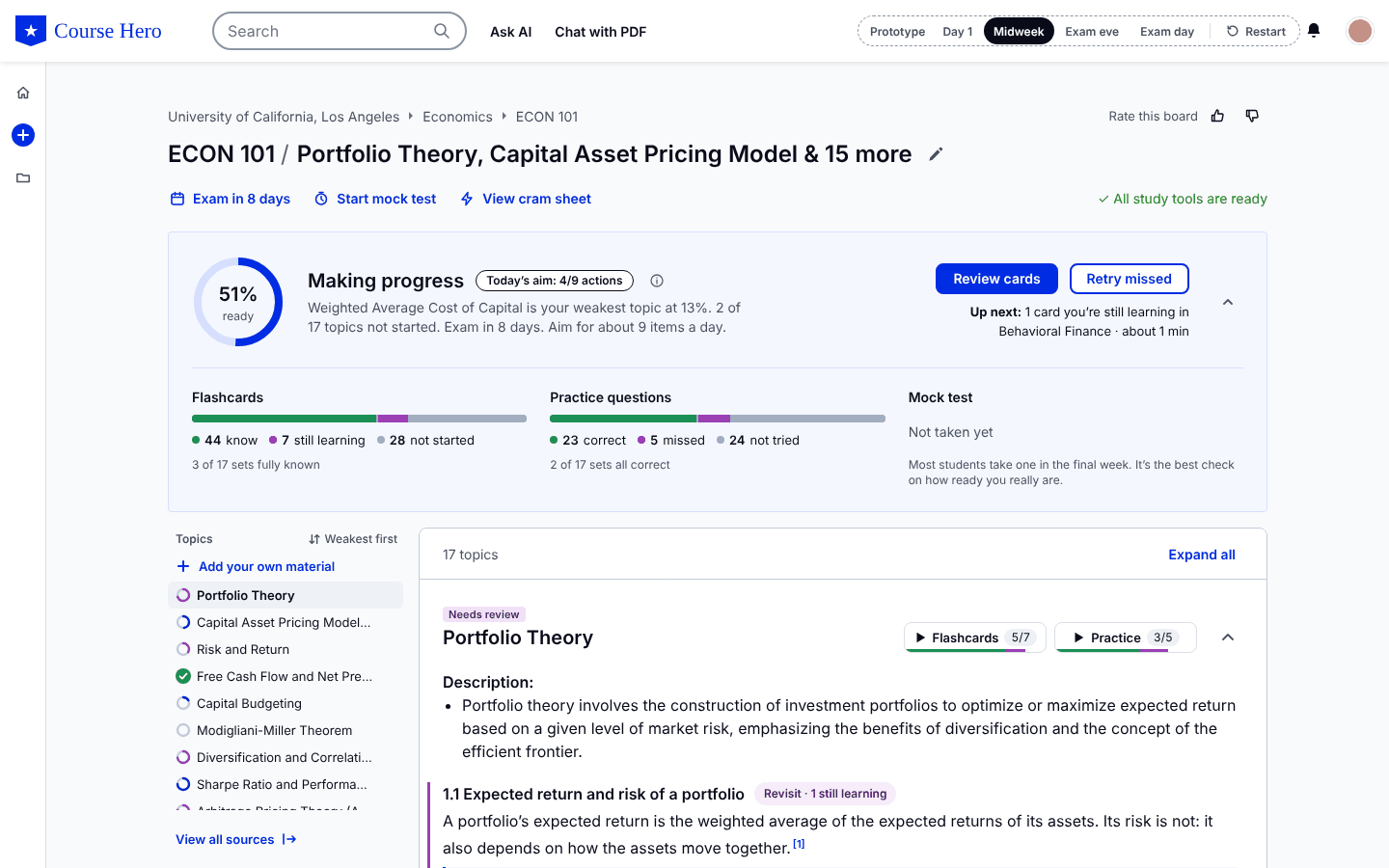
A course-level workspace that builds itself from the assignments, labs, tests and exams already on file. Every board comes with a study guide, flashcards, practice questions, a timed mock test and a cram sheet.

It tracks what a student knows and how ready they are, and suggests what to study next. Giving it a home also meant a redesigned course-add flow and a dashboard organized around active courses.

A Study Board with readiness, topic list and study guide.

How the AI shows up

Six design patterns shaped how the AI behaves in Study Boards. Each one traces back to something students told us, and each one cost us something.

Pattern 1

Start from a course

Setup takes about two minutes. The board suggests topics from the course's peer uploads, each with its source count, and students can add their own material.

WhyGeneric material didn't feel trustworthy. It had to be their school, course and professor.

Trade-offLess open-ended than a chat box.

Pattern 2

Show sources

Every study guide section has numbered citations that jump to the peer upload behind it. A sources panel lists everything in use, and students can exclude any document from their own board.

WhyVisible sourcing gave skeptics a way to check, and the disclaimer reminded over-trusters to.

Trade-offMore on screen, so citations stay small and the panel stays closed until asked.

Pattern 3

Measure readiness

The board shows one number, defined in plain words beside it: 100% means every flashcard is marked Know and every practice question is right. Add an exam date and it becomes a daily aim.

WhyStudents care whether they'll pass, not minutes logged. A number that only moves when you know more is harder to game.

Trade-offIt moves slowly at first, so stage labels and the daily aim give early sessions something to show.

Pattern 4

Know what to do next

The board always offers one primary next step and one alternative: flashcards on day one, later your weakest topic or the questions you missed. Shaky sections get a Revisit tag.

WhyDeciding what to study is where many students stall, and the board has the data to decide.

Trade-offA suggestion can feel bossy, so it's one click to ignore.

Pattern 5

Close the loop after every session

After a mock test or session, students see each topic before and after, plus the move in overall readiness, with a button to start on the weakest.

WhyEffort that doesn't visibly count is easy to quit.

Trade-offSome sessions show small gains. We show the honest number anyway.

Outcome

16%

increase in weekly active users after Study Boards launched

Measured as the eight weeks before launch against the eight weeks after, across courses with a Study Board. No other major acquisition launch shipped in that window.

Why that number mattered: weekly active users show whether students come back on purpose. That was the answer to a funnel losing its search traffic to AI chat: a study habit that doesn't depend on a Google search.

Try the prototype

This is the working prototype, running live. Step through a student's week below, or click around it yourself.

Loading the prototype…

Illustrative content: an ECON 101 board built from 200 placeholder peer uploads. Built with Claude from my Figma designs.

The Study Boards prototype on desktop.

The prototype is built for a desktop screen. Open it on a laptop for the full experience.

Open the prototype ↗
Back Building Shopify's Merchant Marketing Platform Next Retail Associate App

Get in Touch

Let's work together

I'm currently open to new opportunities. If you're looking for a Staff Product Designer who brings clarity to complex problems, let's talk.

Email Me LinkedIn
hello.mandip@gmail.com·Toronto, Canada